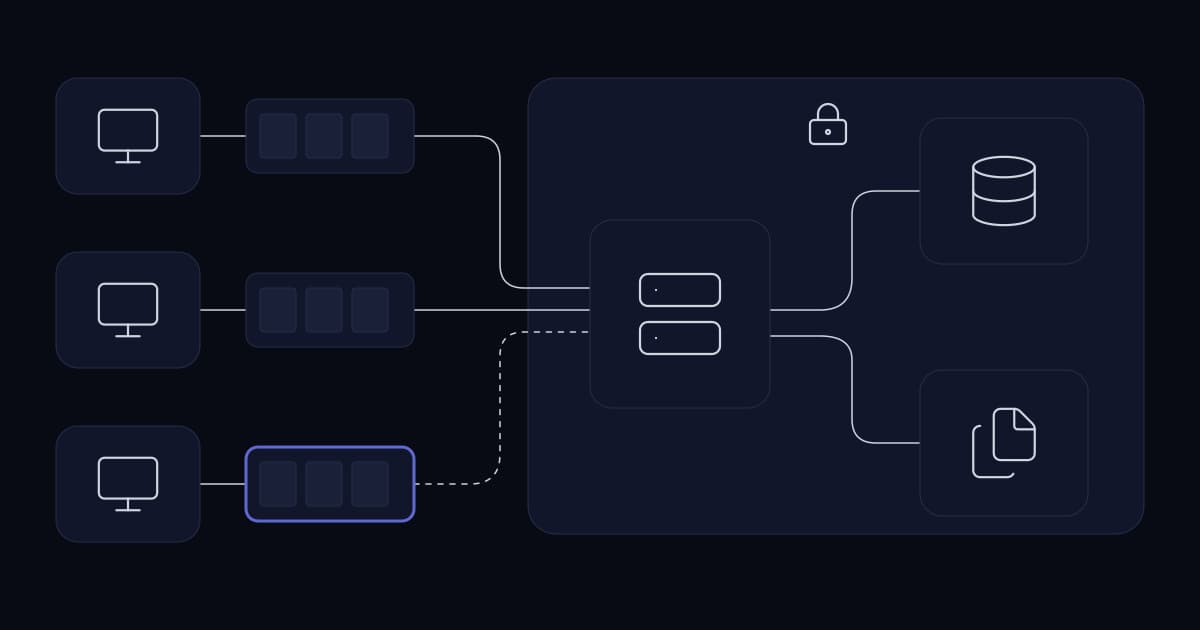
Endpoint monitoring is usually bought as a hosted service, and for most businesses that is the sensible choice: nobody wants to run servers for it. What the buyer is really trusting is the engineering underneath, because screen captures are about as sensitive as business data gets — they collect whatever happened to be on screen rather than what anyone intended to collect — and a hosted platform holds them for many companies at once.
That makes hosting an engineering problem: never lose a capture, and never let one company's data reach another. This is that problem, and the shape the answer takes.
Three constraints decide everything else
| Constraint | What it forces |
|---|---|
| Many companies share one platform | Tenant isolation enforced server-side on every query |
| Endpoints are laptops, not servers | The agent must survive sleep, network loss and being closed |
| A missed capture is a gap in a record | Buffering on the endpoint, not best-effort delivery |
The third is the one that separates a working system from a demo. Everything else in this article is comparatively ordinary engineering; the offline case is where these systems are actually decided.
The agent has to be native, and that decides the language
The agent runs on Windows desktops and needs things a cross-platform runtime does not give you cheaply: reliable capture of the active window, the ability to read which browser tab is in front, and a service that starts before anyone logs in and keeps running when they lock the screen.
That points at a native Windows agent. Ours is C# on .NET, which is the pragmatic choice rather than an ideological one — it has first-class access to the Windows APIs this needs, it deploys as a service without a runtime the user has to install separately, and it is a stack a business can hire for.
Reading the active application without guessing
Activity logging is only useful if it produces something a person can read. A raw process identifier tells a supervisor nothing; the readable application name is what makes the report answerable.
Browser tabs are harder, and the obvious answer is the wrong one. A browser extension gives you the tab directly, and it also means deploying and maintaining an extension on every machine, in every browser, surviving every browser update, and being disabled by anyone who opens the extensions page.
Windows UI Automation — the accessibility framework, the same one screen readers use to understand what is on screen — exposes the active tab without an extension. It is a more stable integration point because it is a documented platform API rather than a browser's extension surface, and it works across browsers without a per-browser build.
Capture over RDP, which most agents cannot do
A large share of monitored work now happens inside a remote desktop session rather than on the physical machine, and this is where many monitoring agents quietly fail: they capture the console session and record a lock screen or a blank desktop while the actual work happens in a session they cannot see.
Handling this correctly means the agent has to be session-aware rather than machine-aware — capturing the session where the user actually is, and following them when that changes. It is not conceptually difficult and it is easy to get wrong, which is why it is worth testing explicitly rather than assuming, in any product being evaluated.
The offline queue is the part that matters
A laptop loses connectivity constantly — a lift, a train, a wifi handover, a VPN drop, a lid closed between meetings. An agent that captures only when it can immediately deliver produces a record with holes in exactly the periods a supervisor is most likely to ask about.
So capture and delivery have to be separated. The agent captures on its own schedule and writes to a local queue; a separate path drains that queue whenever a connection exists. Nothing is dropped because the network was unavailable at the moment of capture.
- 1
Capture writes locally first, always
Never conditionally on connectivity. The capture path should not know or care whether the server is reachable.
- 2
The queue is bounded and has a policy
A laptop offline for a week must not fill its own disk. Deciding what happens at the limit — stop capturing, or discard oldest — is a decision, and leaving it undefined means the disk decides.
- 3
Delivery is idempotent
A connection that drops mid-upload will be retried. Without a stable identifier per capture, retries produce duplicates, and duplicates in an activity report look like activity.
- 4
Treat the buffer as sensitive storage
It holds the same material as the server, on a laptop that may be lost. Whatever protection the endpoint offers — disk encryption, a protected application directory — this is where it has to apply, because the queue is the one place captures sit outside the server's control.
- 5
Sync order does not imply capture order
Timestamps come from the capture, not from arrival. Otherwise a laptop that reconnects after a week reports a week of work as having happened this afternoon.
Two transports, because there are two problems
Presence and capture delivery look similar and have opposite requirements.
| Presence and live view | Capture upload | |
|---|---|---|
| Needs | Low latency, always open | Throughput, resumability |
| Volume | Tiny messages, constant | Large payloads, bursty |
| If it fails | Status goes stale | Data is lost unless queued |
| Shape | Persistent bidirectional connection | Ordinary request, retried |
A persistent WebSocket connection gives instant online and offline state for every endpoint — which a polling design cannot do without either latency or a great deal of wasted traffic — and it is the same channel that makes live view possible, because streaming a screen needs a connection that is already open rather than one negotiated per frame.
Bulk capture upload goes over ordinary requests instead, where retry and resumption are straightforward and a failure costs one upload rather than the connection.
Storage: the decision is where, not how much
Screen recording generates volume continuously. The encoding itself is a solved problem — FFmpeg does it, and there is no reason to build that — but where the output lives is a real decision with real consequences.
- On the endpoint: no network cost, and the footage is lost with the laptop. Rarely the right answer, because the machine holding the evidence is the machine being monitored.
- On the server: centrally controlled and searchable, and every recording crosses the network.
- Split: recent material central, older material retained locally or discarded.
Centralising is the usual answer, and the one we run: media lands on the server, and the endpoint keeps only what has not yet been delivered. What then matters is that retention is enforced automatically rather than by intention — an archive of screen captures with no expiry is the single largest liability this class of system creates, and it accumulates silently.
Enforced means a scheduled sweep that deletes both the database rows and the files on disk, running often enough that a backlog never builds. It also means the sweep should refuse to run on a nonsensical retention value rather than interpreting it — a misconfigured number should stop the job, not empty the table.
One deliberate exception is worth making. The audit log of who did what should not expire, because a retention policy on an audit trail is a policy for destroying the record of the thing you most need to reconstruct. That means it grows without bound, which is a cost worth accepting and worth stating rather than discovering.
Serving the media back, which is harder than storing it
Captures are gated behind the same authorisation as everything else — until the dashboard tries to display one. A browser requesting an image through an ordinary image tag cannot attach an Authorization header, so the token that protects every other request is unavailable at exactly the moment a screenshot is rendered.
The lazy resolutions are both bad. Serving the media directory as static files removes the protection entirely — anyone with a URL, or the patience to guess one, has the archive. Passing the token in the query string puts a credential into browser history, proxy logs and the referrer header.
The workable answer is a URL that carries its own short-lived proof: the path and an expiry, signed server-side, with the signature verified in constant time on request. The URL grants access to one file until it expires and to nothing else, no long-lived credential travels in it, and the dashboard can hand it straight to an image tag.
Live view needs a lock, not just permission
Watching someone's screen in real time is the most invasive thing a monitoring product does, and permission alone does not govern it well. Two supervisors can both hold the permission, both open the same machine, and neither knows the other is there.
A single-viewer session lock fixes that: one viewer at a time, held explicitly, with the holder recorded. It is a small piece of state and it changes the character of the feature — from something that can happen invisibly and repeatedly, to something with exactly one accountable party while it is happening.
This is also the one capability that should have no administrative bypass. A platform operator can legitimately need to administer a company's users without being that company; there is no equivalent argument for watching an individual's screen without holding that company's context deliberately.
Tenancy through enrollment keys
A hosted platform serves many separate companies at once. The question is how an agent, installed on a machine the server has never seen, proves which tenant it belongs to.
An enrollment key issued per company answers it at the only moment it can be answered reliably: install time. The agent presents the key, the server binds that installation to that tenant, and every capture from it is scoped from then on.
The alternative — inferring tenancy from network location or from a machine naming convention — fails the moment someone works from home, renames a machine, or a network is restructured. Tenancy has to be something the endpoint carries, not something the environment implies.
The isolation itself then has to be enforced server-side on every query, not by which dashboard a user is shown. Two decisions in how that is written matter more than the rest.
Resolve the tenant once, and fail closed
Every request should resolve to exactly one company through a single piece of code, and an ordinary account should resolve to its own company with nothing the client sends able to widen it. A platform operator has no company of its own, so it resolves to whichever company it has explicitly selected — held on the server, not in a header or a cookie the browser could edit.
The important case is the one nobody designs for: a platform operator who has not selected anything. The instinct is to treat an unresolved tenant as no filter, which quietly returns every company's rows. The correct handling is the opposite — turn the unresolved tenant into a condition that matches nothing, so the answer to "we cannot tell whose data this is" is to serve none of it.
That single choice is what makes the boundary trustworthy. A scoping helper that omits its filter when it has no company is one missing selection away from a cross-tenant leak; one that emits an always-false condition cannot leak at all, and fails visibly instead.
Answer 404, not 403
When a request names a device belonging to another company, the natural response is 403 Forbidden. It is also a disclosure: 403 confirms the device exists, and an attacker enumerating identifiers learns the shape of every other tenant's fleet from the difference between 403 and 404.
Returning 404 for anything outside the caller's tenant costs nothing and removes that channel entirely. From outside, a device in another company is indistinguishable from a device that does not exist.
How it is deployed
The server side is deliberately unremarkable: the API, the dashboard and MySQL running in Docker behind nginx, with TLS terminated at the proxy. Containers make the platform reproducible, which matters more when you run it for others — a bespoke server build nobody can rebuild is a risk to every customer at once.
- 1
Run the platform as reproducible containers
API, dashboard and database in Docker behind nginx, TLS at the proxy. Nothing about this should be unusual, because unusual infrastructure is infrastructure nobody can operate later.
- 2
Issue an enrollment key per company
The key is what binds an installation to a tenant, so it is issued before any agent is installed rather than configured afterwards.
- 3
Install the agent, scoped at install time
Tenancy is decided here. An agent installed without a key is an agent whose data has nowhere correct to go.
- 4
Configure capture intervals, retention and idle threshold per company
These are the settings that decide both storage cost and whether the resulting reports mean anything. They are per company because operating hours and storage budgets are.
- 5
Operate it every day
Updates, agent releases and the platform's own monitoring are the operator's job, not the customer's. A hosted service nobody actively runs is a server waiting to fail.
The last step is what a customer of a hosted platform is paying for. The customer decides what is captured, who can see it and how long it is kept; running the servers, updating them and keeping them healthy is the operator's job.
What this architecture does not solve
- It does not decide whether monitoring is appropriate, proportionate or disclosed. That is a separate question and a more important one, covered on its own.
- It does not make the data less sensitive. Hosting moves the operational work to the provider, not the sensitivity — the archive still needs access control, storage-level protection and enforced retention.
- It does not answer performance questions. It produces activity data; interpreting it is a management task, and the data does not carry the context that explains it.
- It is not infrastructure monitoring. The server running it still needs the uptime, disk and certificate alerting any server needs.
Why does a monitoring agent need to buffer captures locally?
Because laptops lose connectivity constantly — lifts, trains, wifi handovers, VPN drops, closed lids — and an agent that captures only when it can immediately deliver produces a record with gaps in exactly the periods someone is most likely to ask about. Capture and delivery have to be separated: the agent writes to a local queue on its own schedule, and a separate path drains that queue whenever a connection exists.
Why capture browser tabs through UI Automation rather than a browser extension?
An extension is the obvious answer and the more fragile one. It has to be deployed and maintained on every machine in every browser, survive every browser update, and can be disabled by anyone who opens the extensions page. Windows UI Automation — the accessibility framework screen readers use — exposes the active tab without an extension, works across browsers without a per-browser build, and is a documented platform API rather than a browser's extension surface.
Why do monitoring agents often fail over RDP?
Because they capture the console session rather than the session the user is actually working in, so they record a lock screen or blank desktop while real work happens somewhere they cannot see. Handling it requires the agent to be session-aware rather than machine-aware, capturing the session the user is in and following them when it changes. It is easy to get wrong, so it is worth testing explicitly when evaluating any product in this category.
How should tenancy work when one deployment serves several companies?
Through an enrollment key issued per company and presented at install time, which binds that installation to that tenant for everything it subsequently sends. Inferring tenancy from network location or machine naming fails as soon as someone works from home, a machine is renamed, or a network is restructured — tenancy has to be something the endpoint carries rather than something the environment implies. Isolation must then be enforced server-side on every query, not by which dashboard a user is shown.
Is a hosted monitoring platform safe for sensitive data?
It can be, if the engineering is right. The archive contains incidental sensitive material — whatever happened to be on screen — so it needs tenant isolation enforced on every query, access restricted to a short named list, storage-level protection decided deliberately, and retention enforced automatically. An archive with no expiry is the largest liability this class of system creates, and it accumulates silently.
How do you protect screenshots when a browser cannot send an auth header?
With a URL that carries its own short-lived proof. A browser requesting an image through an ordinary image tag cannot attach an Authorization header, so the usual token is unavailable at exactly the moment a capture is displayed. Signing the path and an expiry server-side, and verifying that signature in constant time on request, grants access to one file until it expires and to nothing else. Serving the media directory statically removes protection entirely, and putting a token in the query string leaks a credential into browser history, proxy logs and the referrer header.
What should happen when a request cannot be resolved to a tenant?
It should return nothing. The instinct is to treat an unresolved tenant as no filter, which quietly returns every company's rows — a scoping helper that omits its filter when it has no company is one missing selection away from a cross-tenant leak. Emitting an always-false condition instead means the answer to "we cannot tell whose data this is" is to serve none of it, so the system fails visibly rather than silently over-sharing.
Sources and further reading
- Workforce monitoring that people accept— whether to deploy this at all, and on what terms — the more important question
- Client portals vs customer portals— tenant isolation as the security model, in general terms
- Data retention and archiving for growing businesses— enforced retention, which this archive needs more than most
- Server virtualisation: what it buys and what it does not— the infrastructure a platform like this runs on
- Server health monitoring— the server running this still needs monitoring of its own
- Choosing a technology stack for business software— why boring, hireable choices win over a decade
- MonitorPro— the product this architecture describes, and what it does
- Microsoft: Windows UI Automation— the accessibility API used for active window and browser tab detection
- RFC 6455: The WebSocket Protocol— the persistent connection behind presence signalling and live view
- Socket.IO documentation— the WebSocket layer used on the server side
- FFmpeg documentation— the encoding layer for screen recording
Services This Relates To
Written by KYCONNECTS Engineering.